
MDM331AID/Experiment 8: Difference between revisions
| Line 7: | Line 7: | ||
== Objectives == | == Objectives == | ||
* To understand the concept of IoT-based sensor data communication. | * To understand the concept of IoT-based sensor data communication. | ||
* To interface an | * To interface an DHT11 temperature sensor with an ESP32 development board. | ||
* To read temperature data from the | * To read temperature data from the DHT11 sensor using the ESP32. | ||
* To connect the ESP32 to a Wi-Fi network and transmit sensor data to a cloud server. | * To connect the ESP32 to a Wi-Fi network and transmit sensor data to a cloud server. | ||
* To store and log the transmitted sensor data in CSV format. | * To store and log the transmitted sensor data in CSV format. | ||
Revision as of 05:17, 7 October 2026
Experiment: Transmit sensor data between an IoT device and a server
Aim
To develop an IoT application that uses the communication protocol to transmit sensor data between an IoT device and a server
Objectives
- To understand the concept of IoT-based sensor data communication.
- To interface an DHT11 temperature sensor with an ESP32 development board.
- To read temperature data from the DHT11 sensor using the ESP32.
- To connect the ESP32 to a Wi-Fi network and transmit sensor data to a cloud server.
- To store and log the transmitted sensor data in CSV format.
Components Required
| Sr. No. | Component | Quantity |
|---|---|---|
| 1 | ESP32 development board | 1 |
| 2 | LM35 temperature sensor | 1 |
| 3 | USB cable | 1 |
| 4 | Patch cords / jumper wires | As required |
| 5 | Wi-Fi network / Internet connection | 1 |
| 6 | Computer with Arduino IDE | 1 |
| 7 | Cloud IoT platform / server (Cognifront IoT Cloud) | 1 account per user/student |
Theory
Internet of Things (IoT) is a technology in which physical devices equipped with sensors, processing units and communication capabilities collect and exchange data over a network. IoT enables sensor data to be transmitted to a remote server or cloud platform for storage, monitoring, analysis and visualization.
An IoT-based sensor data transmission system generally consists of:
- Sensor: Measures a physical quantity and produces an electrical signal corresponding to the measured value. In this experiment, the LM35 is used to measure temperature.
- IoT device / Controller: Reads the sensor output, processes the data and provides network connectivity. In this experiment, the ESP32 acts as the IoT device.
- Communication network: Provides connectivity between the IoT device and the server or cloud platform. The ESP32 uses Wi-Fi for communication.
- Cloud server: Receives and stores the sensor data transmitted by the ESP32. The cloud platform used in this experiment provides facilities for storing and visualizing the sensor data.
- Data storage and analysis: The collected data can be exported in CSV format and analyzed or visualized using Microsoft Excel or other data-processing tools.
LM35 is an analog temperature sensor that produces an output voltage proportional to the temperature. It has a sensitivity of approximately 10 mV per degree Celsius. The ESP32 reads the analog voltage from the LM35 using its analog input and converts the measured voltage into temperature.
The ESP32 is a microcontroller-based development board with built-in Wi-Fi connectivity. After reading the temperature from the LM35, the ESP32 connects to a Wi-Fi network and transmits the sensor data to the cloud server using the configured cloud communication mechanism.
The cloud server receives the temperature readings and stores them as data records. In this experiment, the readings are collected at regular intervals and can be exported as a CSV (Comma-Separated Values) file. The CSV file can then be opened in Microsoft Excel for further analysis, tabulation and visualization.
The overall data flow of the system is:
LM35 Temperature Sensor
          ↓
       ESP32
          ↓
       Wi-Fi
          ↓
    Cloud Server
          ↓
   Data Storage / CSV
This type of IoT-based data logging system can be used for applications such as environmental monitoring, machine condition monitoring, temperature logging and other systems where sensor measurements need to be collected remotely and analyzed.
Actions:
- Write ESP32 code to read temperature data from the LM35 sensor and send it to a cloud server using Wi-Fi.
- Display this reading on a web-based dashboard in real-time.
Setting Up Cloud

Step 1
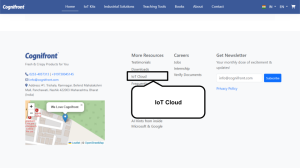
Visit www.cognifront.com and scroll down to the footer section.

Step 2
Click on the IoT Cloud option.

Step 3
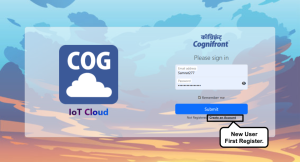
Click on Login or Sign Up / Registration to access your account.

Step 4
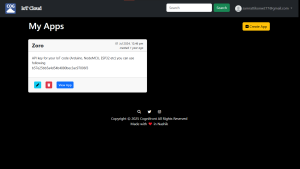
After logging in, navigate to the Dashboard section.

Step 5
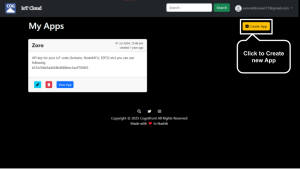
Click on Create New App to start a new cloud application.

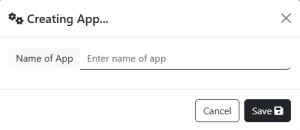
Step 6
Enter your app name — for example, Data Logger.

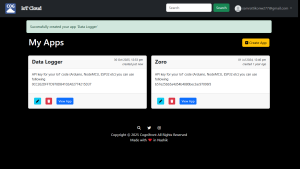
Step 7
Your dashboard will update and display the newly created app.

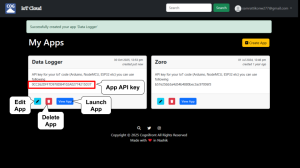
Step 8
Each app shows buttons for Edit, Delete, Launch, and API Key.

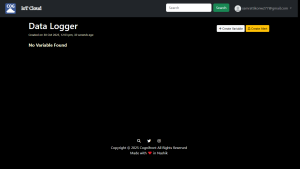
Step 9
Click Edit App to open your app and create variables.

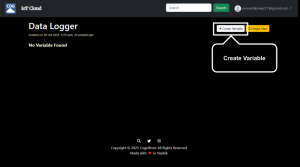
Step 10
Click on Create Variable to define a new data variable.

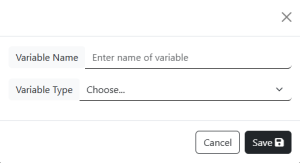
Step 11
Enter a variable name and select its type (defines input/output behavior).

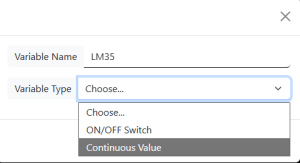
Step 12
For example: Name – LM35, Type – Continuous.

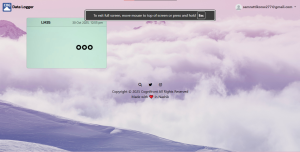
Step 13
Return to the home page and click View App to launch your application.
   Congratulations! Your cloud app is now ready.


Step 14
Open the program folder — you will find two files:
   eecit-exp-06-data-logger.ino (main program) and cogcloudesp.h (library header file).
   Open the .ino file in Arduino IDE.


Step 15
Ensure the cogcloudesp.h header file is included properly in your project.

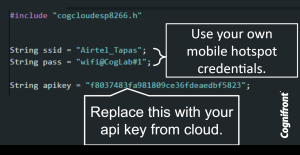
Step 16
Update your code with your Wi-Fi SSID, password, and API key.
   A stable internet connection is required.

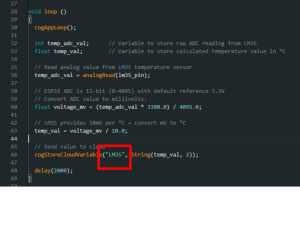
Step 17
Change the variable name in your code to match the one you created in the cloud app.

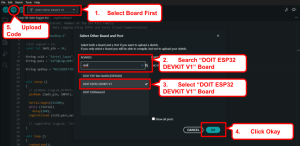
Step 18
Connect your ESP32 to your computer and upload the code.


Step 19
Open or launch your cloud app to visualize real-time sensor data from the LM35.

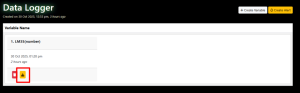
Step 20
In the app settings, click the Download .CSV button to export data.

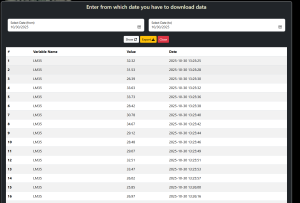
Step 21
Set the desired time range for data export, or leave it blank to download all records.

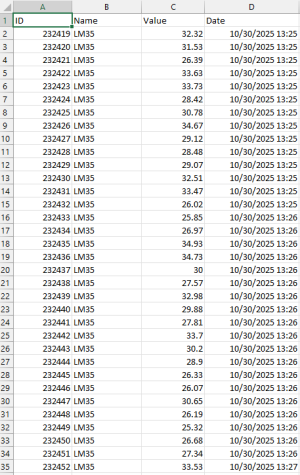
Step 22
Open the downloaded .CSV file in Microsoft Excel to view the logged data.

Circuit & Board Connections
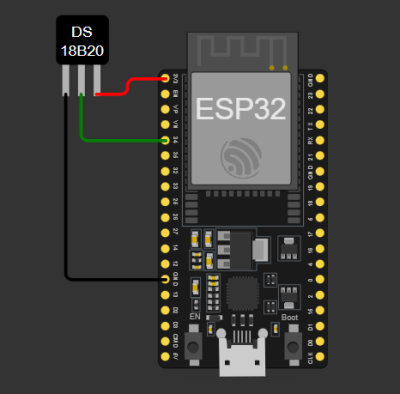
Circuit Diagram

   The complete connection diagram of ESP32-based setup.

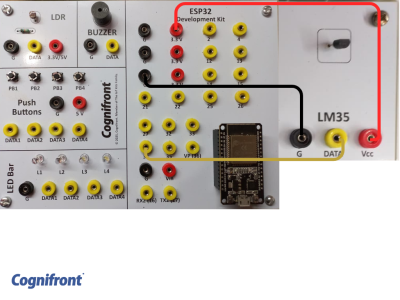
Board Connections

   Actual board wiring layout showing sensor and module connections.

Pin Connections
The following connections are based on the ESP32 and LM35 configuration used in the program.
| LM35 Pin | ESP32 Pin | Description |
|---|---|---|
| GND | GND | Ground connection |
| VCC | 3.3V | Power supply |
| DATA / VOUT | GPIO34 | Analog temperature output |
The USB cable connects the ESP32 to the computer. The computer runs the Arduino IDE and uploads your code to ESP32. ⚠️ Disconnect your ESP32 from the computer while making or removing component connections.
ESP32 Code
// © 2026, Cognifront. Member of The IoT Kits Family.
//Experiment 6: Data Logging Using ESP32 and Excel (Cloud Communication)

#include "cogcloudesp.h"

//int cogLed = 15;
const int lm35_pin = 34;

String ssid = "********"; // wifi/hotspot name
String pass = "********"; // wifi/hotspot password 2.4 hz band only

String apikey = "YOUR_API_KEY_HERE"; // API key from app. Keep the "" (quotes)


void setup ()
{
  // pinMode (cogLed,OUTPUT);
  pinMode (lm35_pin, INPUT);

  Serial.begin(115200);
  while (!Serial)
    delay(100);
  cogInitCloud (ssid,pass,apikey);

  // cogBindPin (cogLed, "LED");
}

void loop ()
{
  cogAppLoop();

  int voltage_mv = analogReadMilliVolts(lm35_pin);
  float temp_val = voltage_mv / 10.0;  // LM35 = 10 mV per °C

  // Send value to cloud
  cogStoreCloudVariable("LM35", String(temp_val, 2));

  delay(2000);
}
⬇ Click Here to Download Code File
(Contains ESP32 source code)
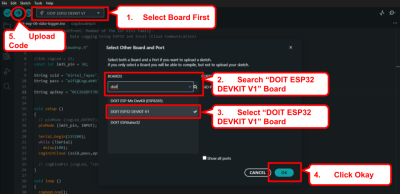
Connect your ESP32 to your computer and upload the code make sure right port selected.
Observation
- The ESP32 successfully reads temperature data from the LM35 sensor.
Conclusion
This experiment demonstrates how to log real-time sensor data from ESP32 to a computer using cloud communication.
Real Life Example
Condition Monitoring in Machines and Data Logging: Sensors collect data such as vibration, temperature, or pressure from mechanical systems, which is logged and analysed in Excel for predictive maintenance and fault diagnosis. Also this data can be fed for training a machine learning model.