
Experiment 7: Stepper Motor Control via Microcontroller ESP32
Experiment 7: Stepper Motor Control via Microcontroller ESP32
Objective
To control the rotation and direction of a stepper motor using ESP32 and a ULN2003 driver.
Task
- Connect stepper motor and driver to ESP32.
- Write code to rotate motor clockwise and counter-clockwise.
- Vary delay to change motor speed.
⚠️ Disconnect your ESP32 from the computer while making or removing component connections.
⚠️ Important Note:
1. Connect only the ESP32 (without any component connections) to the computer via USB.
2. Upload the code to the ESP32.
3. Disconnect the ESP32 from the computer and remove the USB cable.
4. Make all component connections using patch cords as per the circuit diagram.
5. Then connect the 9V adapter to provide external power supply to the stepper motor.
Circuit & Board Connections
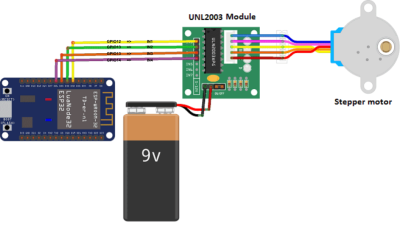
Circuit Diagram

   The complete connection diagram of ESP32-based setup.

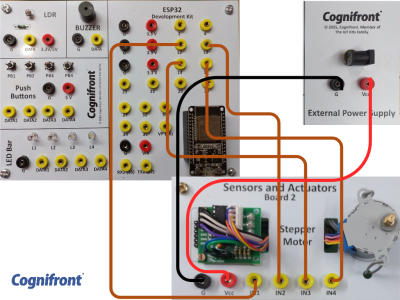
Board Connections

   Actual board wiring layout showing sensor and module connections.

Connections (without LCD)
| Component | ESP32 Pin | Description |
|---|---|---|
| Stepper Motor IN1 | 12 | Control input 1 |
| Stepper Motor IN2 | 13 | Control input 2 |
| Stepper Motor IN3 | 14 | Control input 3 |
| Stepper Motor IN4 | 15 | Control input 4 |
| ULN2003 VCC | External Power Supply VCC | Power supply for driver |
| ULN2003 GND | External Power Supply GND | Common ground |
ESP32 Code
// © 2025, Cognifront. Member of The IoT Kits Family.
// Experiment 7: Stepper Motor Control via Microcontroller (ESP32 Version)

#include <Stepper.h>

// Number of steps per revolution for 28BYJ-48 stepper motor
const int stepsPerRevolution = 2048;

// Define stepper motor control pins (connected to ULN2003 driver)
const int IN1 = 12;
const int IN2 = 13;
const int IN3 = 14;
const int IN4 = 15;

// Create Stepper object (sequence must be IN1, IN3, IN2, IN4 for 28BYJ-48)
Stepper myStepper(stepsPerRevolution, IN1, IN3, IN2, IN4);

void setup() {
  Serial.begin(115200);
  delay(1000);

  Serial.println("\n=== Stepper Motor Speed Test (ESP32) ===");
}

void loop() {
  // Rotate Counterclockwise (CCW) at 5 and 10 RPM
  for (int spd = 5; spd <= 10; spd += 5) {
    myStepper.setSpeed(spd);
    Serial.print("Direction: CCW | Speed: ");
    Serial.print(spd);
    Serial.println(" RPM");

    myStepper.step(stepsPerRevolution / 2); // Half revolution
    delay(500);
  }

  // Rotate Clockwise (CW) at 10 and 5 RPM
  for (int spd = 10; spd >= 5; spd -= 5) {
    myStepper.setSpeed(spd);
    Serial.print("Direction: CW | Speed: ");
    Serial.print(spd);
    Serial.println(" RPM");

    myStepper.step(-stepsPerRevolution / 2); // Half revolution
    delay(500);
  }
}
⬇ Click Here to Download Code File
(Contains ESP32 source code)
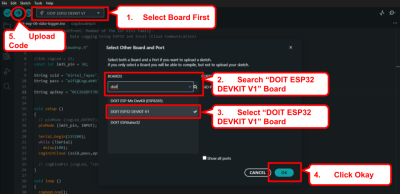
Connect your ESP32 to your computer and upload the code.

Observation
- The stepper motor rotates in both clockwise and counterclockwise directions.
- The motor speed changes as per the programmed RPM values.
- Smooth operation is observed with correct wiring sequence.
Conclusion
The experiment successfully demonstrates control of a stepper motor’s speed and direction using ESP32 and a ULN2003 driver. This forms the basis for applications like robotic motion control, CNC systems, and precise positioning mechanisms.
Real Life Example
CNC Machine Feed Drive: Stepper motors provide precise and repeatable control of tool or table movement along X, Y, and Z axes, ensuring accurate machining operations in computer-controlled manufacturing.