
Experiment 1: Introduction to ESP32 and Digital I/O Control
Objective
To understand digital input/output operations by interfacing LEDs and push buttons with ESP32.
Introduction to ESP32
The ESP32 is a low-cost, low-power system-on-chip (SoC) developed by Espressif Systems. It includes both Wi-Fi and Bluetooth (Classic + BLE) connectivity, making it ideal for various IoT (Internet of Things) applications.
It is the successor to the popular ESP8266, offering higher performance, more GPIO pins, and advanced features such as dual-core processing and hardware encryption.

Key Features
- Dual-core 32-bit processor (Xtensa LX6) up to 240 MHz
- Integrated Wi-Fi (802.11 b/g/n) and Bluetooth 4.2 / BLE
- Up to 520 KB SRAM with external flash support
- Multiple peripherals: ADC, DAC, UART, SPI, I²C, PWM, Touch sensors
- Ultra-low-power modes for battery-powered projects
- On-chip Hall sensor and temperature sensor
Common Applications
- IoT devices and smart home automation
- Wireless sensor networks
- Data logging and remote monitoring
- Robotics and industrial control
- Wearable and Bluetooth-based projects
Task
- Connect LEDs and push buttons to ESP32.
- Write a program to turn LEDs ON/OFF based on button press.
- Observe the response on the Serial Monitor.
⚠️ Disconnect your ESP32 from the computer while making or removing component connections.
Circuit & Board Connections
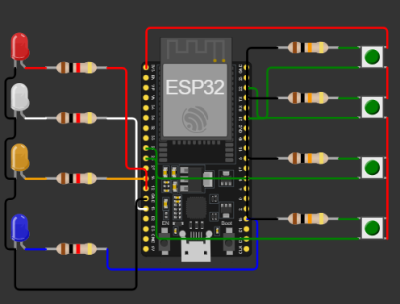
Circuit Diagram

   The complete connection diagram of ESP32-based setup.

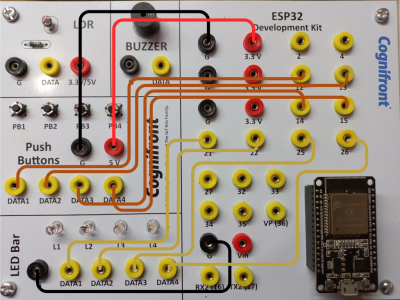
Board Connections

   Actual board wiring layout showing sensor and module connections.

Circuit Connections
| Push Button | ESP32 Pin |
|---|---|
| Push Button 1 | 12 |
| Push Button 2 | 13 |
| Push Button 3 | 14 |
| Push Button 4 | 15 |
| Push Button GND | GND |
| Push Button VCC | 3.3 V / Vin |
| LED Bar | ESP32 Pin |
|---|---|
| LED 1 | 21 |
| LED 2 | 22 |
| LED 3 | 25 |
| LED 4 | 26 |
| LED GND | GND |
- Serial Communication: 9600 baud rate
ESP32 Code
// © 2025, Cognifront. Member of The IoT Kits Family.
// Experiment 1: Introduction to Arduino/ESP32 and Digital I/O Control

// Define push button input pins
int push1Pin = 12;
int push2Pin = 13;
int push3Pin = 14;
int push4Pin = 15;

// Variables to store button states
int push1Value;
int push2Value;
int push3Value;
int push4Value;

// Define LED output pins
int ledPin1 = 21;
int ledPin2 = 22;
int ledPin3 = 25;
int ledPin4 = 26;

void setup() {
  // Start serial communication for debugging
  Serial.begin(9600);

  // Set push button pins as INPUT with internal pull-down or pull-up as needed
  pinMode(push1Pin, INPUT);
  pinMode(push2Pin, INPUT);
  pinMode(push3Pin, INPUT);
  pinMode(push4Pin, INPUT);

  // Set LED pins as OUTPUT
  pinMode(ledPin1, OUTPUT);
  pinMode(ledPin2, OUTPUT);
  pinMode(ledPin3, OUTPUT);
  pinMode(ledPin4, OUTPUT);

  Serial.println("System Initialized: Monitoring Push Buttons and LEDs...");
}

void loop() {
  // Read button states (LOW = pressed when using INPUT_PULLUP)
  push1Value = digitalRead(push1Pin);
  push2Value = digitalRead(push2Pin);
  push3Value = digitalRead(push3Pin);
  push4Value = digitalRead(push4Pin);

  // Control LEDs based on button pressed
  if (push1Value == HIGH) {
    digitalWrite(ledPin1, HIGH);
    digitalWrite(ledPin2, LOW);
    digitalWrite(ledPin3, LOW);
    digitalWrite(ledPin4, LOW);
    Serial.println("Button1 PRESSED → LED1 ON");
  }
  else if (push2Value == HIGH) {
    digitalWrite(ledPin1, LOW);
    digitalWrite(ledPin2, HIGH);
    digitalWrite(ledPin3, LOW);
    digitalWrite(ledPin4, LOW);
    Serial.println("Button2 PRESSED → LED2 ON");
  }
  else if (push3Value == HIGH) {
    digitalWrite(ledPin1, LOW);
    digitalWrite(ledPin2, LOW);
    digitalWrite(ledPin3, HIGH);
    digitalWrite(ledPin4, LOW);
    Serial.println("Button3 PRESSED → LED3 ON");
  }
  else if (push4Value == HIGH) {
    digitalWrite(ledPin1, LOW);
    digitalWrite(ledPin2, LOW);
    digitalWrite(ledPin3, LOW);
    digitalWrite(ledPin4, HIGH);
    Serial.println("Button4 PRESSED → LED4 ON");
  }
  else {
    // If no button is pressed, turn off all LEDs
    digitalWrite(ledPin1, LOW);
    digitalWrite(ledPin2, LOW);
    digitalWrite(ledPin3, LOW);
    digitalWrite(ledPin4, LOW);
    Serial.println("No button pressed → All LEDs OFF");
  }

  // Print raw button states
  Serial.print("Buttons: ");
  Serial.print(push1Value);
  Serial.print(" ");
  Serial.print(push2Value);
  Serial.print(" ");
  Serial.print(push3Value);
  Serial.print(" ");
  Serial.println(push4Value);

  delay(300); // Small delay for readability
}
⬇ Click Here to Download Code File
(Contains ESP32 source code)
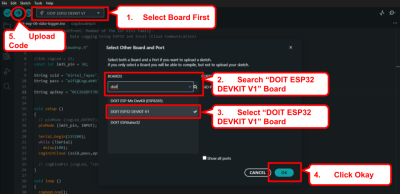
Connect your ESP32 to your computer and upload the code.

Observation
- Pressing any button will turn ON the corresponding LED.
- Only one LED lights up at a time because of the else-if structure.
- Serial Monitor can be used to confirm button press readings.
Conclusion
This experiment demonstrates basic digital input and output control using ESP32.
Real Life Examples
Automated Assembly Line Control: Digital I/O is used to operate actuators, solenoids, and indicator lamps. For example, pressing a start button activates a conveyor motor, demonstrating machine automation control in manufacturing lines.