
Experiment 2: Analog Sensor Interfacing (Temperature Sensor -LM35) with ESP32
Objective
To interface the LM35 analog temperature sensor with ESP32 and display the output on Serial Monitor or LCD.
Task
- Connect LM35 to ESP32 analog pin.
- Write code to read and convert analog voltage to Celsius.
- Display output on Serial Monitor or LCD.
⚠️ Disconnect your ESP32 from the computer while making or removing component connections.
Circuit & Board Connections

Circuit Diagram

   The complete connection diagram of ESP32-based setup.

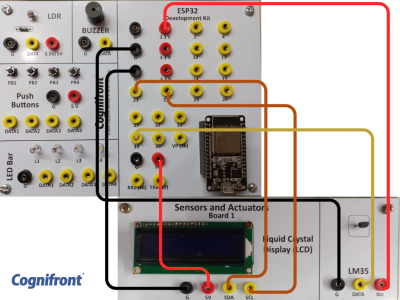
Board Connections

   Actual board wiring layout showing sensor and module connections.

Connections
| LM35 Pin | ESP32 Pin |
|---|---|
| VCC (Pin 1) | 3.3V |
| OUT (Pin 2) | 34 |
| GND (Pin 3) | GND |
ESP32 I2C Pins (for LCD)
| Function | ESP32 UNO Pin |
|---|---|
| SDA | 21 |
| SCL | 22 |
Important
Before uploading your ESP32 code, make sure you have installed the following libraries in the Arduino IDE: 1. Wire.h – For I²C communication between ESP32 and peripheral devices. 2. LiquidCrystal_I2C.h – For controlling LCD displays using the I²C interface.
 |
 |
✅ Install via (ZIP Method):
Sketch → Include Library → Add .ZIP Library → Select Downloaded .zip File → Open → Wait for “Library Installed” message
✅ Verify :
Sketch → Include Library → The included library name should be present
ESP32 Code
// © 2025, Cognifront. Member of The IoT Kits Family.
// Experiment 2: Analog Sensor Interfacing (Temperature Sensor - LM35)
/*
  🔌 LCD CONNECTIONS (16x2 I2C Display with ESP32)
  ------------------------------------------------
  LCD Pin     →  ESP32 Pin
  ----------------------------
  GND         →  GND
  VCC         →  3.3V or 5V  (depends on your module)
  SDA         →  GPIO21
  SCL         →  GPIO22

  ⚙️ NOTES:
  - Common I2C LCD addresses: 0x27 or 0x3F
  - If no text appears, change this line:
        LiquidCrystal_I2C lcd(0x27, 16, 2);
    to:
        LiquidCrystal_I2C lcd(0x3F, 16, 2);
  - LM35 temperature sensor input → GPIO34 (ADC input only)
*/
#include <Wire.h>
#include <LiquidCrystal_I2C.h>

const int lm35_pin = 34;   // LM35 -> GPIO34 (ADC input only)
LiquidCrystal_I2C lcd(0x27, 16, 2);

void setup() {
  Serial.begin(9600);
  Wire.begin(21, 22);   // SDA=21, SCL=22

  lcd.begin();
  lcd.backlight();

  Serial.println("System Initialized: LM35 Temperature Monitoring on ESP32");
}

void loop() {
  // Use ESP32 built-in calibrated ADC reading
  int voltage_mv = analogReadMilliVolts(lm35_pin);
  float temp_val = voltage_mv / 10.0;  // LM35 = 10 mV per °C

  Serial.print("Voltage (mV): ");
  Serial.print(voltage_mv);
  Serial.print(" -> Temp: ");
  Serial.print(temp_val, 1);
  Serial.println(" °C");

  lcd.clear();
  lcd.setCursor(0, 0);
  lcd.print("Temp: ");
  lcd.print(temp_val, 1);
  lcd.print((char)223);
  lcd.print("C");

  lcd.setCursor(0, 1);
  lcd.print("LM35 Sensor");

  delay(2000);
}
⚠️ If you encounter an error with lcd.begin(), try using lcd.init() instead — or vice versa.
⬇ Click Here to Download Code File
(Contains ESP32 source code)
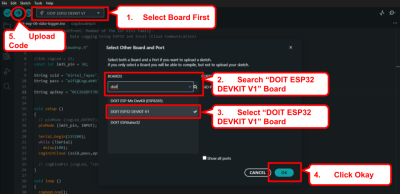
Connect your ESP32 to your computer and upload the code make sure right port selected.

Notes
- The LM35 outputs 10mV per °C directly proportional to temperature.
- Make sure the LCD's I2C address (0x27 in this case) matches your module.
- For ESP32, I2C pins are SDA → A4 and SCL → A5.
Observation
- The Serial Monitor displays the real-time temperature in Celsius.
- The LCD continuously updates and shows the measured temperature along with the label "LM35 Sensor".
- The temperature reading changes when the sensor is touched or exposed to a different heat source.
Conclusion
- The LM35 sensor was successfully interfaced with ESP32.
- The analog voltage output of the sensor was converted into a temperature value (°C).
- Data was accurately displayed on both the Serial Monitor and LCD, confirming correct sensor operation and code functionality.
Real Life Examples
Thermal Monitoring in CNC Machines: The LM35 sensor measures spindle or bearing temperatures to prevent overheating and ensure safe operation of high-speed cutting tools and mechanical components.