
IPDL Kits User Manuals: Difference between revisions
No edit summary |
|||
| (20 intermediate revisions by the same user not shown) | |||
| Line 1: | Line 1: | ||
<div style="text-align:center; | <div style="text-align:center;"> | ||
<span style="font-size:200%; font-weight:bold;"> | [[File:Sppu-logo.jpg|200px|SPPU Logo]] | ||
</div> | |||
<div style="text-align:center;"> | |||
<span style="font-size:200%; font-weight:bold;">IoT based Product Development Laboratory (IPDL)</span> | |||
<br> | <br> | ||
<span style="font-size:120%;">IoT Development | <span style="font-size:120%;">Cognifront IPDL Kit for MDM-331-IT IoT based Product Development Lab</span> | ||
</div> | </div> | ||
| Line 27: | Line 31: | ||
<gallery mode="packed" heights="170"> | <gallery mode="packed" heights="170"> | ||
File: | File:Ipdl-arduino-uno.jpg|<div style="text-align:center; font-size:120%;"><b>Arduino Uno Board</b></div><div style="text-align:left;">Used for Arduino programming, LED control, sensor interfacing and Bluetooth-based automation experiments.</div> | ||
Ipdl-esp32.jpg|<div style="text-align:center; font-size:120%;"><b>ESP32 Board</b></div><div style="text-align:left;">ESP8266 board with built-in Wi-Fi connectivity, featuring onboard LEDs, buzzer, push buttons, and LDR (Light Dependent Resistor) sensor for hands-on IoT experimentation.</div> | |||
File: | File:Ipdl-nodemcu-esp8266.jpg|<div style="text-align:center; font-size:120%;"><b>NodeMCU ESP8266 Board</b></div><div style="text-align:left;">Includes DC motor, stepper motor, ESP-based communication and other IoT-oriented interfaces.</div> | ||
File:Ipdl-rpi.jpg|<div style="text-align:center; font-size:120%;"><b>Raspberry Pi 4 Board</b></div><div style="text-align:left;">Contains Raspberry Pi 4 4 GB RAM, micro HDMI to HDMI convertor, VGA to HDMI, RPi Power Supply, SD Card with Raspbian OS and Camera, with LED, Buzzer, Push Buttons</div> | |||
Ipdl-sa-a.jpg|<div style="text-align:center; font-size:120%;"><b>Sensor and Actuator Board A</b></div><div style="text-align:left;">Has Bluetooth module, DHT11 temperature and humidity sensor, relay module with 3-pin socket, and ultrasonic distance sensor for IoT and automation experiments.</div> | |||
File:Ipdl-sa-b.jpg|<div style="text-align:center; font-size:120%;"><b>Sensor and Actuator Board B</b></div><div style="text-align:left;">Has a stepper motor module and ULN2003 driver, DC motor with L293D driver, servo motor, and external DC power supply input through a DC jack.</div> | |||
</gallery> | </gallery> | ||
== Experiments == | == Experiments == | ||
| Line 55: | Line 48: | ||
! Platform / Technology | ! Platform / Technology | ||
|- | |- | ||
| ''' | | '''IPDL - 1''' | ||
| [[ | | [[IPDL - 1: Study and Survey of Various Development Boards for IoT]] | ||
| Arduino, NodeMCU, ESP8266, ESP32, Raspberry Pi | | Arduino, NodeMCU, ESP8266, ESP32, Raspberry Pi | ||
|- | |- | ||
| ''' | | '''IPDL - 2''' | ||
| [[ | | [[IPDL - 2: Study and Survey of Various IoT Platforms]] | ||
| IoT Platforms / Cloud Platforms | | IoT Platforms / Cloud Platforms | ||
|- | |- | ||
| ''' | | '''IPDL - 3''' | ||
| [[ | | [[IPDL - 3: LED Blinking with Arduino Uno]] | ||
| Arduino Uno, LED | | Arduino Uno, LED | ||
|- | |- | ||
| ''' | | '''IPDL - 4''' | ||
| [[ | | [[IPDL - 4: IoT Sensor Interface with Arduino]] | ||
| Arduino Uno, Temperature / Light Sensors | | Arduino Uno, Temperature / Light Sensors | ||
|- | |- | ||
| ''' | | '''IPDL - 5''' | ||
| [[ | | [[IPDL - 5: Integration of Actuators with NodeMCU]] | ||
| NodeMCU, Servo Motor, Relay | | NodeMCU, Servo Motor, Relay | ||
|- | |- | ||
| ''' | | '''IPDL - 6''' | ||
| [[ | | [[IPDL - 6: DC Motor and Stepper Motor Control with Raspberry Pi]] | ||
| Raspberry Pi, DC Motor, Stepper Motor | | Raspberry Pi, DC Motor, Stepper Motor | ||
|} | |} | ||
| Line 87: | Line 80: | ||
! Platform / Technology | ! Platform / Technology | ||
|- | |- | ||
| ''' | | '''IPDL - 7''' | ||
| [[ | | [[IPDL - 7: LED Control Using ESP8266 and Blynk App]] | ||
| ESP8266, Blynk | | ESP8266, Blynk | ||
|- | |- | ||
| ''' | | '''IPDL - 8''' | ||
| [[ | | [[IPDL - 8: Cloud Ready Temperature Sensor Using Raspberry Pi and ThingSpeak]] | ||
| Raspberry Pi, DHT11, ThingSpeak | | Raspberry Pi, DHT11, ThingSpeak | ||
|- | |- | ||
| ''' | | '''IPDL - 9''' | ||
| [[ | | [[IPDL - 9: Web-Based Home Automation Using Arduino Uno and Bluetooth]] | ||
| Arduino Uno, Bluetooth, Home Automation | | Arduino Uno, Bluetooth, Home Automation | ||
|- | |- | ||
| ''' | | '''IPDL - 10''' | ||
| [[ | | [[IPDL - 10: HTTP Server Using ESP32 for Actuator Control]] | ||
| ESP32, HTTP, Web Server, LED, Buzzer, Relay | | ESP32, HTTP, Web Server, LED, Buzzer, Relay | ||
|- | |- | ||
| ''' | | '''IPDL - 11''' | ||
| [[ | | [[IPDL - 11: Web-Based Display of Humidity and Temperature Data]] | ||
| Temperature | | ESP32, Temperature and Humidity Sensor, Web Application | ||
|} | |} | ||
<div style="background:#f5f5f5; border-left:5px solid #3366cc; padding:10px; margin:15px 0;"> | <div style="background:#f5f5f5; border-left:5px solid #3366cc; padding:10px; margin:15px 0;"> | ||
<b>Group B Requirement:</b> Any '''Three''' experiments from | <b>Group B Requirement:</b> Any '''Three''' experiments from IPDL-7 to IPDL-11 are to be performed. | ||
</div> | </div> | ||
| Line 119: | Line 112: | ||
! Key Technologies | ! Key Technologies | ||
|- | |- | ||
| ''' | | '''IPDL - 12''' | ||
| [[ | | [[IPDL - 12: TCP/UDP Server for Sensor Data]] | ||
| | | ESP32, TCP, UDP, Sensor Data | ||
|- | |- | ||
| ''' | | '''IPDL - 13''' | ||
| [[ | | [[IPDL - 13: 6LoWPAN Protocol Demonstration]] | ||
| 6LoWPAN, IPv6, IEEE 802.15.4, IoT Gateway | | 6LoWPAN, IPv6, IEEE 802.15.4, IoT Gateway | ||
|- | |- | ||
| ''' | | '''IPDL - 14''' | ||
| [[ | | [[IPDL - 14: Temperature Publishing Using MQTT / RESTful APIs]] | ||
| Temperature Sensor, MQTT, REST API | | Temperature Sensor, MQTT, REST API | ||
|- | |- | ||
| ''' | | '''IPDL - 15''' | ||
| [[ | | [[IPDL - 15: IoT-Based Small Project]] | ||
| IoT, Simulation Platforms, Automation, Social / Environmental Applications | | IoT, Simulation Platforms, Automation, Social / Environmental Applications | ||
|} | |} | ||
| Line 188: | Line 181: | ||
| Tinkercad, Cooja | | Tinkercad, Cooja | ||
|} | |} | ||
== Software & Development Tools == | == Software & Development Tools == | ||
Latest revision as of 08:44, 25 September 2026

IoT based Product Development Laboratory (IPDL)
Cognifront IPDL Kit for MDM-331-IT IoT based Product Development Lab
| Laboratory Overview | |
|---|---|
| Subject | Internet of Things / IDPL |
| Laboratory Type | Practical / Experiential Learning |
| Platforms | Arduino, NodeMCU, ESP8266, ESP32, Raspberry Pi |
| Technologies | IoT, Cloud, Web, MQTT, REST, TCP/UDP, IEEE 802.15.4, 6LoWPAN |
| Target Users | Third Year Information Technology (IT) Department Students |
Laboratory Hardware
-
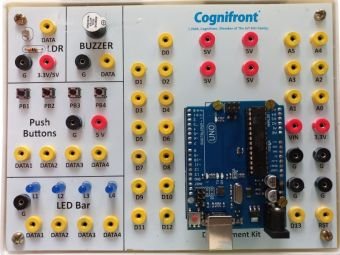 Arduino Uno BoardUsed for Arduino programming, LED control, sensor interfacing and Bluetooth-based automation experiments.
 -
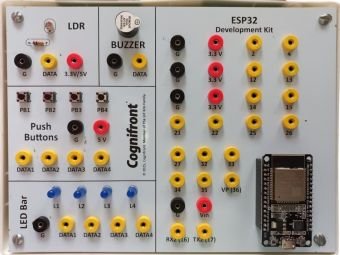 ESP32 BoardESP8266 board with built-in Wi-Fi connectivity, featuring onboard LEDs, buzzer, push buttons, and LDR (Light Dependent Resistor) sensor for hands-on IoT experimentation.
 -
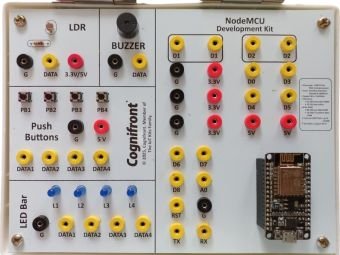 NodeMCU ESP8266 BoardIncludes DC motor, stepper motor, ESP-based communication and other IoT-oriented interfaces.
 -
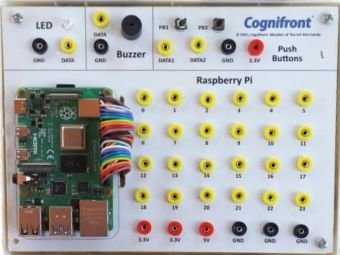 Raspberry Pi 4 BoardContains Raspberry Pi 4 4 GB RAM, micro HDMI to HDMI convertor, VGA to HDMI, RPi Power Supply, SD Card with Raspbian OS and Camera, with LED, Buzzer, Push Buttons
 -
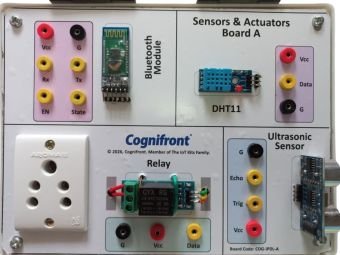 Sensor and Actuator Board AHas Bluetooth module, DHT11 temperature and humidity sensor, relay module with 3-pin socket, and ultrasonic distance sensor for IoT and automation experiments.
 -
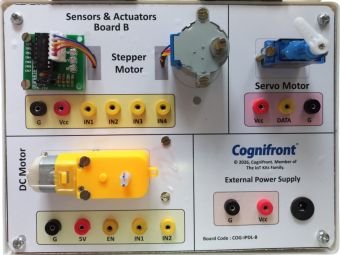 Sensor and Actuator Board BHas a stepper motor module and ULN2003 driver, DC motor with L293D driver, servo motor, and external DC power supply input through a DC jack.


Experiments
Group A — Compulsory Experiments
| ID | Experiment | Platform / Technology |
|---|---|---|
| IPDL - 1 | IPDL - 1: Study and Survey of Various Development Boards for IoT | Arduino, NodeMCU, ESP8266, ESP32, Raspberry Pi |
| IPDL - 2 | IPDL - 2: Study and Survey of Various IoT Platforms | IoT Platforms / Cloud Platforms |
| IPDL - 3 | IPDL - 3: LED Blinking with Arduino Uno | Arduino Uno, LED |
| IPDL - 4 | IPDL - 4: IoT Sensor Interface with Arduino | Arduino Uno, Temperature / Light Sensors |
| IPDL - 5 | IPDL - 5: Integration of Actuators with NodeMCU | NodeMCU, Servo Motor, Relay |
| IPDL - 6 | IPDL - 6: DC Motor and Stepper Motor Control with Raspberry Pi | Raspberry Pi, DC Motor, Stepper Motor |
Group B — Any Three Experiments
| ID | Experiment | Platform / Technology |
|---|---|---|
| IPDL - 7 | IPDL - 7: LED Control Using ESP8266 and Blynk App | ESP8266, Blynk |
| IPDL - 8 | IPDL - 8: Cloud Ready Temperature Sensor Using Raspberry Pi and ThingSpeak | Raspberry Pi, DHT11, ThingSpeak |
| IPDL - 9 | IPDL - 9: Web-Based Home Automation Using Arduino Uno and Bluetooth | Arduino Uno, Bluetooth, Home Automation |
| IPDL - 10 | IPDL - 10: HTTP Server Using ESP32 for Actuator Control | ESP32, HTTP, Web Server, LED, Buzzer, Relay |
| IPDL - 11 | IPDL - 11: Web-Based Display of Humidity and Temperature Data | ESP32, Temperature and Humidity Sensor, Web Application |
Group B Requirement: Any Three experiments from IPDL-7 to IPDL-11 are to be performed.
Group C — Mini Project
| ID | Mini Project | Key Technologies |
|---|---|---|
| IPDL - 12 | IPDL - 12: TCP/UDP Server for Sensor Data | ESP32, TCP, UDP, Sensor Data |
| IPDL - 13 | IPDL - 13: 6LoWPAN Protocol Demonstration | 6LoWPAN, IPv6, IEEE 802.15.4, IoT Gateway |
| IPDL - 14 | IPDL - 14: Temperature Publishing Using MQTT / RESTful APIs | Temperature Sensor, MQTT, REST API |
| IPDL - 15 | IPDL - 15: IoT-Based Small Project | IoT, Simulation Platforms, Automation, Social / Environmental Applications |
Group C Requirement: One mini project is to be performed by a group of 3 students.
Group C — Mini Project Guidelines
Students may select one of the prescribed mini-project topics or develop an IoT solution based on a small real-world problem statement.
Possible application areas include:
- Smart Home / Home Automation
- Environmental Monitoring
- Social Issues
- Chatbot-based IoT Applications
- Smart Agriculture
- Smart Campus
- Industrial IoT
- Energy Monitoring
- Safety and Security
The project may be implemented using physical IoT hardware or an IoT simulation platform such as Tinkercad or Cooja, depending on the selected problem statement.
Technologies Covered
| Category | Technologies / Platforms |
|---|---|
| Development Boards | Arduino Uno, NodeMCU, ESP8266, ESP32, Raspberry Pi |
| Sensors | Temperature Sensor, DHT11, Light Sensor and other IoT Sensors |
| Actuators | LED, Buzzer, Relay, Servo Motor, DC Motor, Stepper Motor |
| Cloud Platforms | Blynk, ThingSpeak and other IoT Platforms |
| Web Technologies | HTTP, Web Server, Web Application |
| Communication | Bluetooth, TCP, UDP, MQTT, REST |
| Networking | IPv6, IEEE 802.15.4, 6LoWPAN |
| Simulation | Tinkercad, Cooja |
Software & Development Tools
| Tool / Platform | Purpose |
|---|---|
| Arduino IDE | Programming Arduino, ESP8266, ESP32 and compatible boards. |
| Blynk | Mobile / web-based IoT device control and monitoring. |
| ThingSpeak | Cloud-based IoT data collection and visualization. |
| Tinkercad | Simulation of Arduino and electronic circuits. |
| Cooja | Simulation and experimentation with IoT / low-power networks. |
| Web Browser | Accessing web-based IoT dashboards and ESP32 web servers. |
| Serial Monitor | Debugging and monitoring communication between the computer and IoT board. |
Experiments Mapping with Kit
The following document provides the mapping between the prescribed IDPL experiments and the components available in the laboratory kit.
📄 Download IDPL Experiments Mapping (PDF)
Arduino IDE Installation Guide
The Arduino IDE can be used for programming Arduino Uno, ESP8266, ESP32 and other supported development boards.
📄 Download Arduino IDE Installation Guide (PDF)
Recommended Documentation
Students should maintain an experiment record containing:
- Aim / Objective
- Required Hardware
- Required Software
- Theory
- Circuit / Block Diagram
- Pin Connections
- Program / Source Code
- Procedure
- Observations
- Output / Screenshots
- Result
- Conclusion
- Viva Questions
Applications
The concepts covered in this laboratory can be extended to:
- Smart Home Automation
- Smart Agriculture
- Smart Campus
- Industrial IoT
- Environmental Monitoring
- Remote Monitoring
- Energy Management
- Healthcare Monitoring
- IoT-Based Security Systems
- Robotics and Automation